
Why I built a canvas to see all my Claude Code agents at a glance
Running several Claude Code and Codex agents turned my job into checking on them. Why I built a canvas where every agent's state reads at a glance.
I've been a software engineer for eight years, and I also run Developer Timeline, where developers go to laugh at the job they know too well. Over the last year, more and more of my work moved from writing code to directing coding agents: Claude Code in one terminal, Codex in another, sometimes four or five sessions on two projects at once.
The agents got good fast. What didn't keep up was everything around them. My day filled with a new kind of work: checking. Which agent finished? Which one is stuck on a permission prompt? Which one asked me a question ten minutes ago while I was reading another one's diff? Which one left a dev server running on port 3000?
Terminal tabs answer all of those the same way: click into each one and read. So I built Starkomand: an infinite canvas for my Claude Code and Codex agents, where the state of every agent is readable at a glance. This post is about why, and about the decisions behind it.
How do you keep track of multiple Claude Code sessions?
The question I ask most is "who needs me?" When one agent runs, you watch it. When four run, you can't watch any of them. You need each window to tell you, from across the screen, one of three things:
- it is working, and on what,
- it is waiting on you, and for how long,
- it is finished, and what it said at the end.
A tab title can't do that. A notification tells you something happened but not what the screen looks like now. So the first rule I wrote for Starkomand was this one: every agent's state must be readable without focusing its window.
In practice it looks like this:
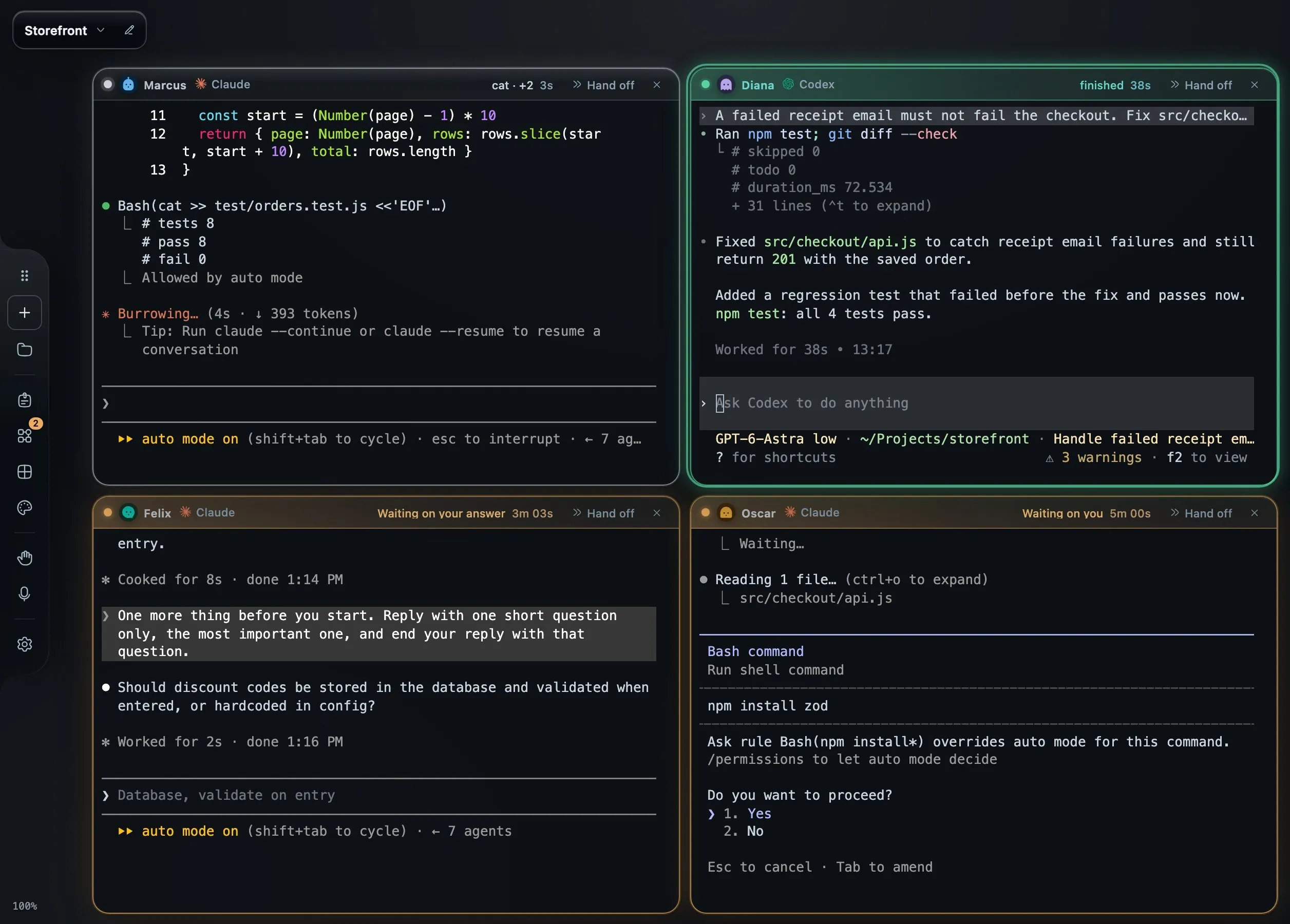
Real Claude Code and Codex sessions on a small demo repository.
Each agent is the real CLI in a real terminal window. The header says what the agent is doing and for how long. Amber means it is waiting on me, with a timer, because a question that has sat for five minutes is five minutes of an agent doing nothing. Green means it finished, with how long the turn took.
When I come back to my desk, I tap Space and every window turns over:
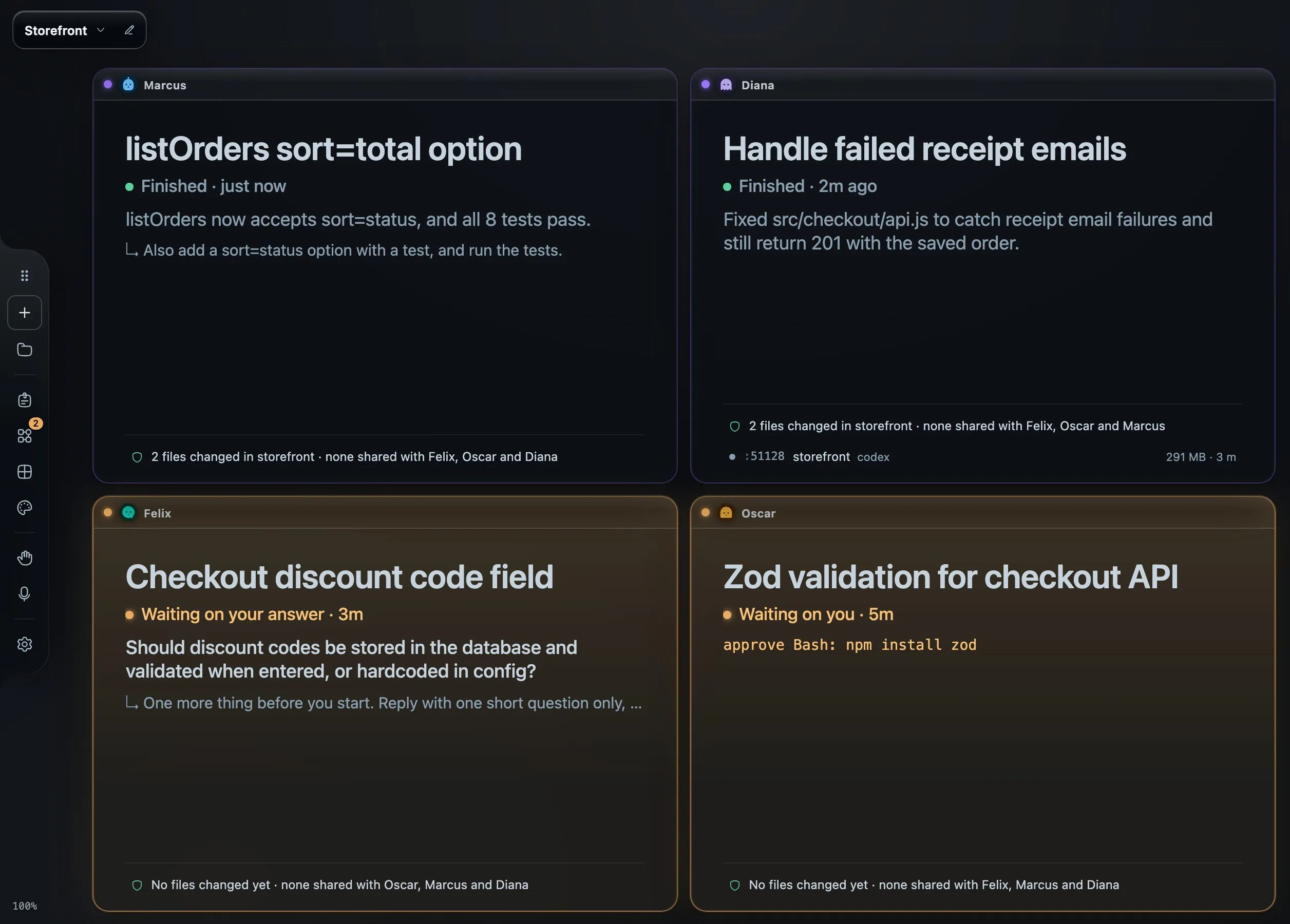
The same four sessions, turned over.
The back of each window is a summary I don't have to ask for: the conversation's title, where it stands, the agent's last line, the files it changed and whether another agent touched them, the dev servers it left running, and the pull requests it opened. None of that calls a model. It comes from the agent CLI's own session files and hooks.
Why a canvas and not another tab?
The other half of the checking problem is context. An agent's work is never just the terminal. There is the issue it is working on, the diagram that explains the bug, the page it built, the pull request it opened, and the dev server it started. On a normal day those live in five different apps.
So Starkomand is an infinite canvas, and the context sits next to the agent it belongs to:
- A GitHub issue is a sticky note. Drop it on an agent's window and the agent starts on it. The note stays pinned to that window, so the canvas shows who has which ticket.
- Ask an agent to draw the system and the diagram lands beside its terminal, hand-drawn and editable.
- A preview of what it built opens in a browser window next to it.
- A thin line connects each diagram and preview back to the agent that made it.
I picked a canvas over panes because tasks don't arrive with a fixed number of panels. You start with one agent and a question, then add a diagram, then a preview, then a second agent to review. A canvas gives each of those somewhere to go, and zooming out shows the whole thing.
The decisions behind it
A few choices shaped everything else.
Your agents, your subscriptions. Starkomand runs the CLIs you already have installed, signed in as you: Claude Code, Codex, Cursor, Gemini CLI, Grok, Copilot, OpenCode and others. It doesn't wrap them in its own chat UI, resell tokens or ask for an API key. The tradeoff is that I can only show what a CLI reports. For the ones that report nothing, there is an opt-in mode that reads the screen.
Nothing calls a model on its own. A workspace that quietly spends your tokens to summarize things is a workspace you can't trust. Window backs, states and model routing are all local rules. The one exception is opt-in: Smart reading can ask a small model that runs on your Mac's CPU when a rule can't tell an offer ("Want me to add tests?") from a real question ("Pick staging or prod."). Anything it decided is labelled as such.
Sessions outlive the UI. The terminals live in a local server, not in the window. I can hide the canvas, crash it or reload it, and the agents keep working. With one setting, a MacBook stays awake with its lid closed while agents work and sleeps when they finish. The honest limit: restarting the Mac ends live sessions. The canvas, notes and task history survive.
Color means state, nothing else. The canvas is dark glass and stays quiet. Green is finished, amber is waiting on you, red is a turn that stopped short or a risky change. If everything is highlighted, nothing is.
It's not an editor. I still use mine. Starkomand sits next to it and holds the agents and their context.
I build it with itself
Starkomand is a solo project, and I build it with agents running on its own canvas. That means I'm the first person to hit every rough edge, and most features answer a question I kept asking my own screen:
- "What was this one doing?" became the back of the window.
- "How long has it been waiting?" became the timer in the header.
- "Is it asking me, or just offering?" became Smart reading.
- "Whose dev server is this?" became the Ports widget, which lists every server on the Mac by the agent that started it.
That loop is also how I decide what not to build. If a feature makes my own canvas noisier, it doesn't ship, or it ships off by default.
Who it's for
It's for engineers who run more than one coding agent and spend real time checking on them. If one agent in one terminal is your whole workflow, you probably don't need it yet.
It runs on Macs with Apple silicon for now, with a Windows version coming. There's no account, and the 3-day trial includes every feature. After that it's a one-time license, not a subscription.
If you try it, I'd like to hear where it gets in your way. And if you run several agents with a different setup, tell me in the comments how you keep track of who needs you. I'm curious what works for other people.
Try Starkomand free for 3 days on the agents you already run.