
Claude Code notifications: know when it finishes or needs you
Claude Code notifications on a Mac: what each terminal does by default, a sound when Claude finishes, hooks for approval prompts, and Codex alerts too.
Claude Code notifications depend on your terminal. In Ghostty, Kitty and iTerm2 you can get a desktop notification when Claude finishes or stops for approval. In Apple Terminal you get a silent bell at most, and in most others nothing. A hook fixes that in every terminal.
The settings below come from Anthropic's terminal and hooks docs and OpenAI's Codex config docs, read on 3 November 2026. I build Starkomand, a Mac app for running coding agents on one canvas, and the last section covers what it does when several agents run at once.
What does Claude Code do by default?
When Claude finishes or pauses for a permission prompt and you appear to be away, it fires a notification event. What you see next depends on the terminal:
- Ghostty and Kitty: a desktop notification, with no setup.
- iTerm2: a desktop notification, once you turn on its alerts.
- Apple Terminal: no sound, and a silent bell character at most.
- Everything else, including Warp and the VS Code terminal: nothing.
To turn on iTerm2's alerts, open Settings → Profiles → Terminal, check Notification Center Alerts, click Filter Alerts and enable Send escape sequence-generated alerts. If a notification still does not appear, check that your terminal has notification permission in macOS.
To send the bell character in any terminal, add this to ~/.claude/settings.json:
{
  "preferredNotifChannel": "terminal_bell"
}
In Apple Terminal, also turn on Settings → Profiles → Advanced → Audible bell.
How do I get a sound when Claude Code finishes?
Use a Stop hook, which fires whenever Claude finishes responding. Add it to ~/.claude/settings.json:
{
  "hooks": {
    "Stop": [
      {
        "hooks": [
          { "type": "command", "command": "afplay /System/Library/Sounds/Glass.aiff" }
        ]
      }
    ]
  }
}
Stop runs at the end of every response, including one that ends on a question, and not only when a whole task is complete. It does not fire when you interrupt Claude, and an API error fires StopFailure instead. Any file in /System/Library/Sounds/ works.
How do I get an alert when Claude needs approval?
A permission prompt is the alert most worth having, because Claude stops and waits for as long as you leave it.
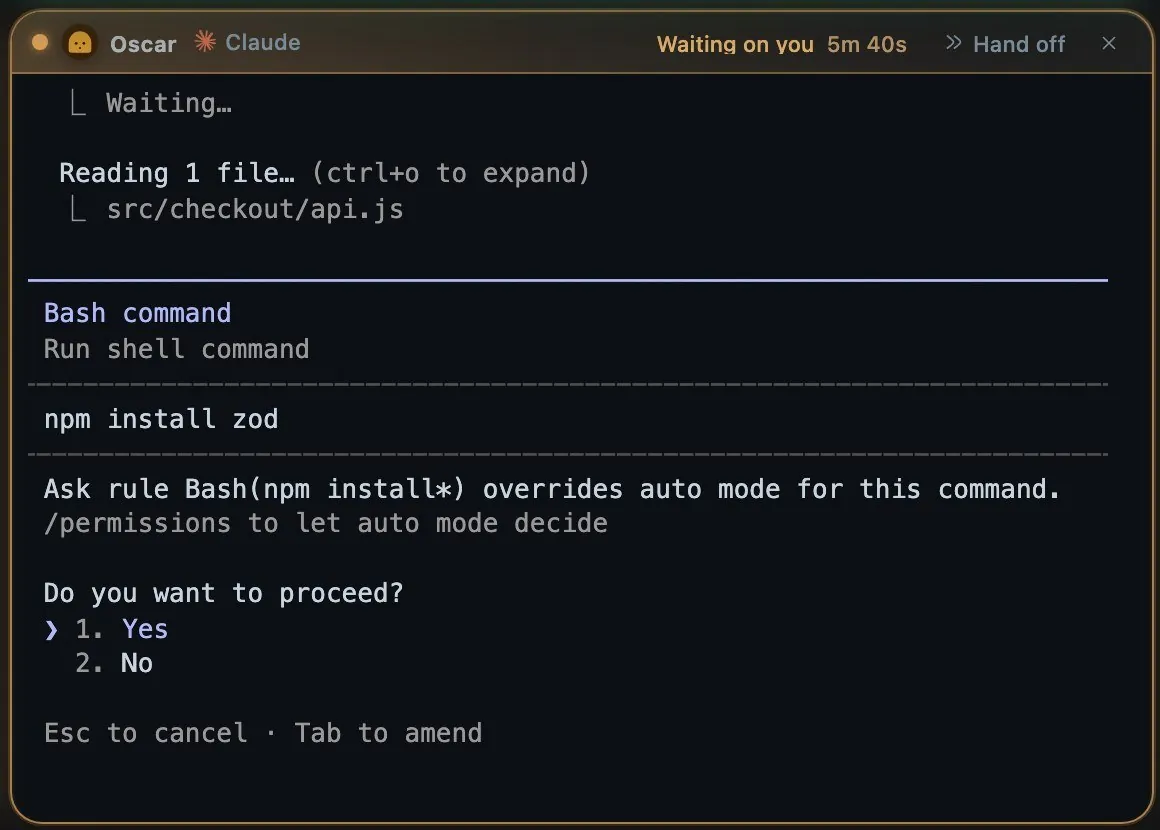
A real Claude Code permission prompt, on a demo project with an ask rule on npm install.
Use a Notification hook with a matcher. This one shows a macOS banner when a permission prompt has been waiting:
{
  "hooks": {
    "Notification": [
      {
        "matcher": "permission_prompt",
        "hooks": [
          {
            "type": "command",
            "command": "osascript -e 'display notification \"Claude Code needs your approval\" with title \"Claude Code\"'"
          }
        ]
      }
    ]
  }
}
If your settings already have a hooks key, add Notification beside the existing events, so Stop and Notification sit in one hooks object.
These are the matchers you will use most. An empty matcher fires on all of them:
| Matcher | Fires when |
|---|---|
permission_prompt |
Claude needs approval and the prompt has waited about six seconds |
idle_prompt |
Claude finished about 60 seconds ago and you have not typed since |
elicitation_dialog |
An MCP server opens a form and you have not typed for about six seconds |
auth_success |
Authentication completes |
So a Stop hook tells you at once, and idle_prompt tells you only if you did not come back within a minute. Use the first if you step away for every turn, and the second if a sound on every response gets tiresome.
Hooks run alongside the built-in notification and do not replace it.
Why does the osascript hook show nothing?
osascript sends notifications through the built-in Script Editor app. If Script Editor has no notification permission, the command fails silently and macOS does not ask. Run this once so that it appears in your settings:
osascript -e 'display notification "test"'
Nothing appears yet. Open System Settings → Notifications, find Script Editor, and turn on Allow Notifications. Run the command again to confirm.
Do notifications work in tmux and over SSH?
In tmux, add set -g allow-passthrough on to ~/.tmux.conf. Without it, tmux swallows the notification before your terminal sees it. The Claude Code tmux setup has the full config.
Over SSH, the desktop notification reaches your local machine, so a remote session can still alert you. Ghostty and Kitty forward it with no setup, and iTerm2 needs the alert settings above. A hook is different, because it runs on the machine where Claude Code runs, so afplay on a server plays nothing on your Mac.
On your phone, a hook can run any command, including a curl to a push service you trust. Think about what the message contains before you send it to a third party.
How do I get Codex notifications?
Codex has two settings, both in ~/.codex/config.toml:
notify = ["python3", "/path/to/notify.py"]

[tui]
notifications = ["agent-turn-complete", "approval-requested"]
notification_method = "auto"
notification_condition = "unfocused"
notify runs an external program and currently fires only for agent-turn-complete. The program receives one JSON argument with fields such as cwd and last-assistant-message. Keep it above any [table] header, because it is a top-level key.
tui.notifications is built into the interface and can filter by event, which makes it the one that covers approvals. notification_method takes auto, osc9 or bel, and auto prefers OSC 9 and falls back to the bell. notification_condition takes unfocused or always. Remove the notify line if you have no script to run.
Which agent finished, when several are running?
A sound tells you that something stopped. With three or four agents, you then go looking for which one, and whether it finished or asked you something.
Starkomand handles this without a hook. Each agent is a window on one canvas, and a finished window gets a green ring and stays marked until you focus it.
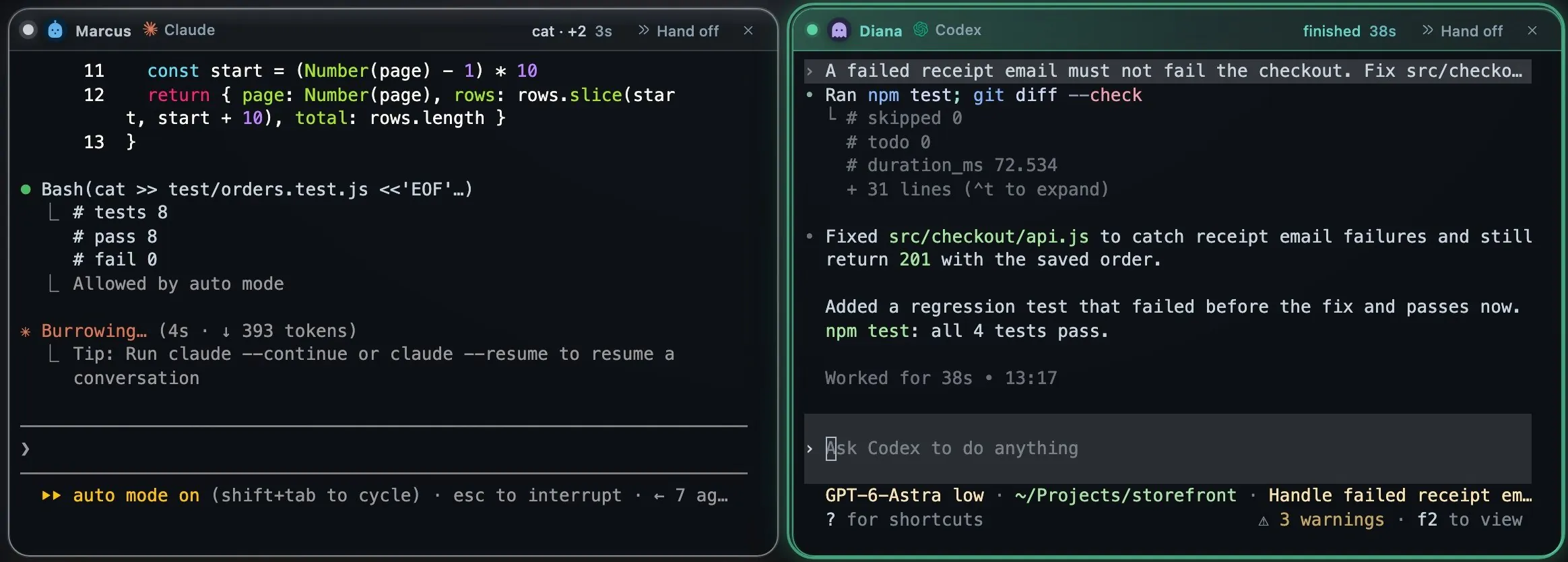
Real sessions on a demo project: Claude Code still working on the left, Codex finished on the right.
Settings → Voice & speech → Announce finishes and questions speaks the name and workspace, for example "Diana finished in Storefront" or "Felix has a question in Storefront." It works while the canvas is hidden, it holds its lines while your microphone is open, and you can pick the system voice. The workspace is left out when you only have one. A finish comes from the app's own view of each agent's turn, so Codex and other CLIs are covered too.
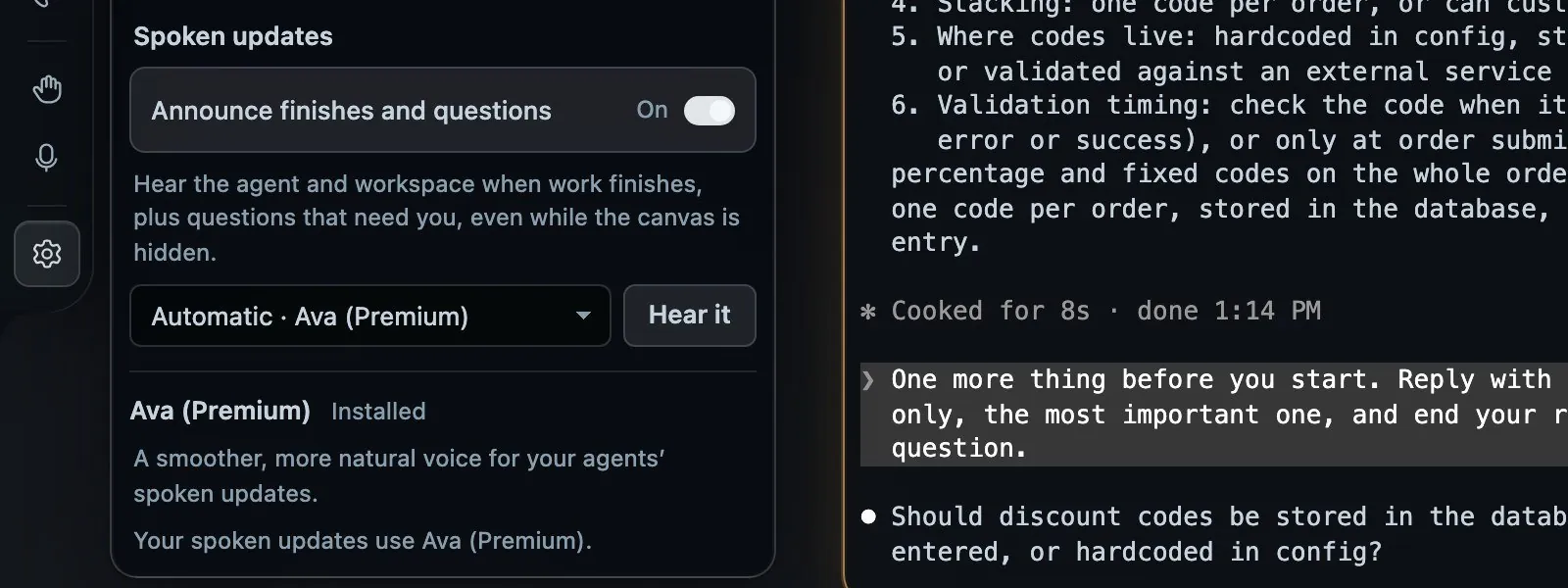
The setting, with an agent window behind the panel.
Tap Space and every window turns over to show the agent's last line. A turn that ended on a question reads Waiting on your answer, with the question beneath it. For Codex, this needs Settings → Privacy → Agent activity turned on, because Codex asks you to trust its hooks once.
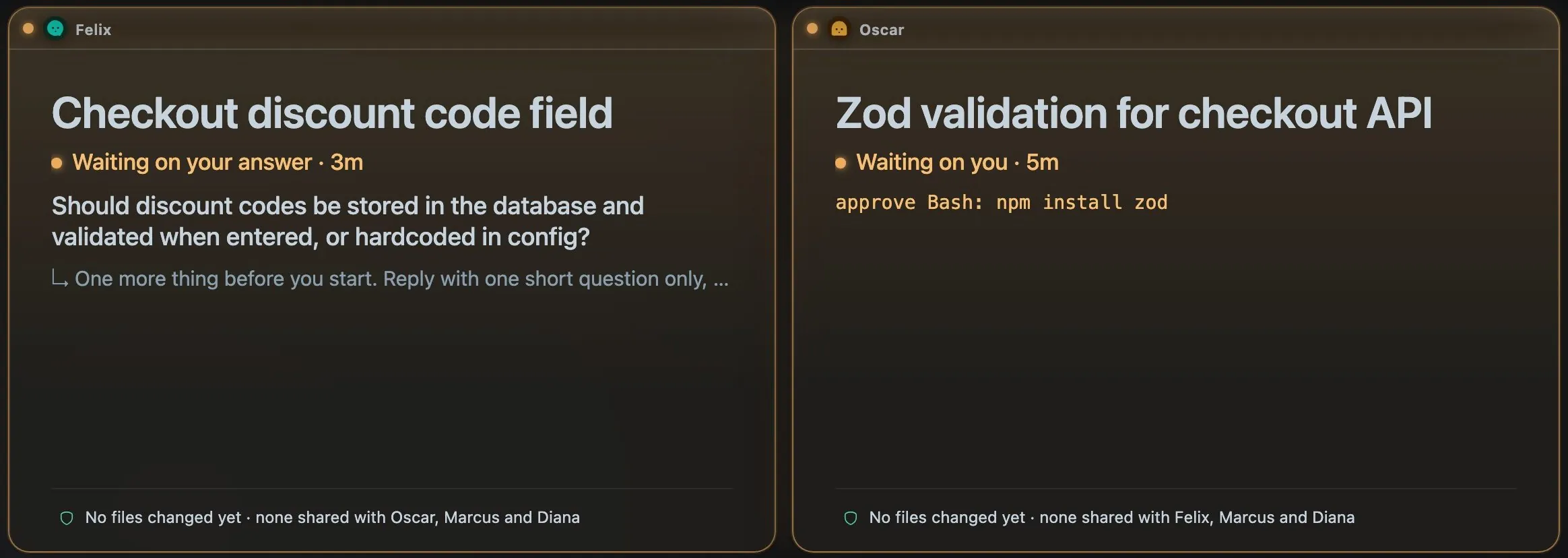
Real sessions turned over with a tap of Space. The titles are the agents' own names for each conversation.
There are limits. Finished agents get speech and a marked window, with no Notification Center banner and nothing on your phone. If you need those, use the hooks above, which keep working inside a Starkomand window because the agent is still the real CLI.
The Starkomand features in this walkthrough
- Spoken updates and voice commands: Settings → Voice & speech.
- Turn every window over to see where each agent stands.
- Claude Code, Codex and other CLI agents with your own sign-ins.
More walkthroughs: the best terminal for Claude Code on a Mac, how to run Claude Code in tmux, and how to keep track of multiple agent sessions.
To hear your own agents report in, start the 3-day trial of Starkomand. It includes every feature, and your agents keep using the subscriptions you already have.