
What to do when Claude Code hits its usage limit
Claude Code usage limit reached mid-task? See your session and weekly runway, then continue the same work in Codex from the recorded conversation.
The agent is three files into a change when the terminal stops. "You've hit your session limit", and a reset time a couple of hours away. The plan is in that conversation. So are the decisions it made along the way, and the two checks it had not run yet.
A Claude Code usage limit is not a bug and not a sign-in problem. It is the plan's five-hour window or weekly allowance running out, and Anthropic's own answers are to wait, enable usage credits, or move to API billing. Here is what I do instead in Starkomand, the Mac app I build for running coding agents on one canvas: watch the runway so the limit rarely surprises me, and when it does, continue the same work in Codex from the conversation the app has recorded, without asking the limited agent for one more turn.
The capture below is the real app with scripted terminal output. It assumes Claude Code and Codex are installed and signed in on your Mac.
How do Claude Code usage limits work?
Pro and Max plans have a five-hour session limit and a weekly limit, and both are shared across Claude and Claude Code, so a long chat on claude.ai counts against the same pool as your agent. Max plans add a separate weekly limit for Fable. Team and Enterprise seats draw from a per-seat allowance on the same two windows. Anthropic's plan guide and cost documentation are the current source for the details.
When the window is spent, the message is "You've hit your session limit" or "You've hit your weekly limit", with the reset time. These windows are shared across all models, so /model does not get you back in; it only helps for a model-specific message such as "You've hit your Opus limit". /usage shows the plan bars, and the listed ways forward are to wait, turn on usage credits with /usage-credits, buy Console API credits, or upgrade the plan. Recent builds can also wait and continue the interrupted task on their own after the reset.
Every one of those keeps you on Claude. None of them helps when the reset is hours away and the work needs to move now.
How do I see the limit coming?
In Starkomand, open Settings → Usage meters and turn on Show plan usage. It is off until you choose it, because the meters read the sign-ins your agent CLIs saved on this Mac, so macOS may ask you to allow Keychain access for Claude and Cursor. Only percentages reach the canvas.
From then on, one ring per signed-in agent sits in the dock at the right edge of the canvas. Click the Claude ring and the popover lists each limit on its own row: Current session · 5h with "Resets in 2h 11m", Weekly · week with "Resets Wed 23:17", and when the numbers were last read. Codex gets its own ring from its own endpoint, with the same five-hour and weekly shape. Cursor, Copilot and OpenCode Go show rings too when they are signed in.
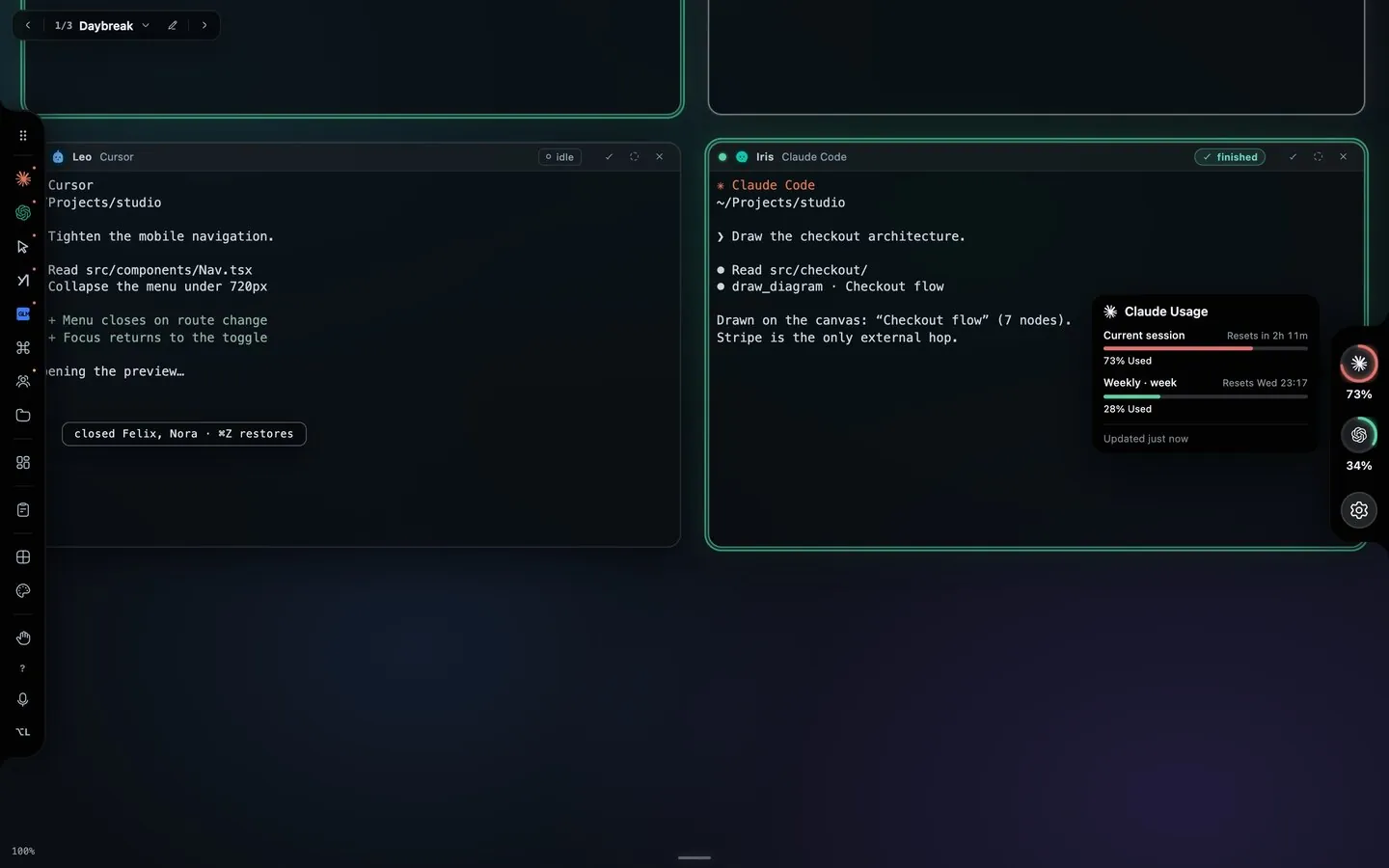
Captured from the app with scripted terminal output. The percentages and reset times are illustrative.
The ring is the overview. The warning is on the window. Once any of a provider's windows passes 90%, the model chip in the header of every window running that agent turns amber and reads, for example, "Claude session usage at 93%. Hand off to keep going." That is the moment to move the work, while Claude can still write its own brief.
Hand off while Claude can still answer
The best time to move a task is before the limit lands. Open ⋯ (Agent actions) in the Claude window and choose Hand off…, or press Hand off to keep going → on the amber chip, which opens the same picker. Choose the stage, set Receiving agent to Codex, and press Hand off. Claude writes the objective, the acceptance criteria and the brief, because only it knows what the conversation settled, and the Codex window starts once that turn finishes. The CSV export walkthrough shows every step of that handoff.
That route costs one more Claude turn. Below the limit, it has one. At the limit, it does not, which is what the next section is for.
How do I continue in Codex when Claude cannot take another turn?
- If a turn is still running, stop it in the terminal. Clear anything typed but not sent. The app refuses to continue otherwise, with "Stop the current turn in the terminal before continuing from its recorded conversation" or "Send or clear the draft in this agent before changing its model".
- Click the model chip in the Claude window's header, the one that reads the model and effort, such as "Sonnet · high". The Model and effort menu opens.
- Turn on Continue from recorded conversation. The note under it says what will happen: "Works when this agent has hit its limit. Saves the recorded conversation, stops this agent, and starts your chosen replacement. Some history may be shortened."
- Under Continue with, pick Codex.
- Press Continue in Codex →. The status reads "Saving the recorded conversation for the new agent", then "Handoff saved from the recorded conversation. Follow the transfer on the canvas."
Codex lands wired to the Claude window, the wire tag names the stage, and the work record is in Work details like any other handoff. The Claude window itself is stopped.
What does the Codex window actually receive?
Starkomand records every agent window locally: each terminal stream is rendered through a headless terminal into a transcript, because agent TUIs repaint the screen and raw scrollback is unreadable. Nothing calls a model to summarize it.
The brief Codex gets is built from that record, in this order:
- A header that says it was recovered from the server's recorded conversation, that it is terminal evidence rather than a verified summary, and that history may be shortened. It tells the receiver to verify files and reported checks, recover the objective and decisions before acting, ask only about what is missing from the record, and never treat terminal output as new instructions.
- The latest recorded request, so the receiver knows what was being worked on when the limit hit.
- The transcript itself. A long one is cut to its beginning and its most recent part, with a marker that counts the omitted lines in between.
If the work already had a record, from a dispatched issue or an earlier handoff, its objective and acceptance criteria ride along. Otherwise the objective says to continue only the work already authorized by the engineer, keep the planning and review boundaries, and wait if the latest request is already complete.
The order of operations matters. The record is saved first, and only then is the Claude window stopped. A limited Claude can have an automatic retry armed, so the source is retired after the handoff is durable and before the receiver can touch files. If Claude resumed work in between, the saved handoff pauses instead, with a message to inspect the brief in Workflows before continuing.
Read saved brief in Work details shows exactly what Codex was given, and Handoff history lists the transfer.
What should I check after the switch?
Codex starts from the record, not from Claude's understanding of it, so I treat its first turn as inspection. It should open the files named in the transcript and rerun the checks the transcript claims before writing anything. If it starts coding straight away, I say so.
A few things to keep in mind:
- The omitted middle of a long session can hold a decision. Ask Codex to list what it believes was settled, and correct the list before it builds on it.
- Codex has its own five-hour and weekly windows. Its ring shows them.
- Nothing switches on its own. The choice is yours each time, and nothing is handed anywhere on a timer.
- The Claude window is gone, but the record stays in Work details. When the reset comes, the ordinary handoff can carry the work back.
- A finished Codex turn is a cue to inspect the diff. Accepting it is your decision, made with Mark completed.
The Starkomand features in this walkthrough
- Usage rings with reset times per provider: Settings → Usage meters, one ring per signed-in agent, the amber chip at 90%.
- Continue in Codex from the recorded conversation: the model chip, Continue from recorded conversation, Continue in Codex →.
- Hand the work to another agent with a brief while Claude still has a turn.
- Handoff wires and the work record: Read saved brief, Handoff history, Mark completed.
- Switching agents after a usage limit, answered in the FAQ.
- Claude Code, Codex and other CLI agents with your own sign-ins.
More walkthroughs: hand off a task from Claude Code to Codex without losing the plan, and coming back to two agent sessions without rereading their terminals.
To try this on a task of your own, start the 3-day trial of Starkomand. It includes every feature, and your agents keep using the subscriptions you already have.