
Hand off a task from Claude Code to Codex without losing the plan
How to hand off a task from Claude Code to Codex: plan a CSV export, then pass the objective, acceptance criteria and brief to Codex in Starkomand.
“Add an Export CSV button” sounds like a small request. Then the questions arrive. Should it export the current page or every matching row? Does it respect the search filter? Which columns belong in the file?
I like to plan with one agent and implement with another. Here is how I hand off a task from Claude Code to Codex in Starkomand, the Mac app I build for running coding agents on one canvas, so that the objective, acceptance criteria and brief travel with the work instead of staying in a chat I would have to retype.
The example is an issue tracker. The agent names, files and terminal output in the images are scripted for this walkthrough; the controls are the app's own. It assumes Claude Code and Codex are installed and signed in on your Mac.
Why do the decisions get lost between planning and building?
A planning conversation is not a brief. What matters (“every page”, “keep the sort”, “quote the commas”) is spread across several turns and mixed with ideas the agent tried and dropped. Codex cannot read Claude Code's conversation, and a pasted transcript brings the noise along with the decisions. So the usual handoff is a summary retyped from memory, and anything I forget becomes a guess.
In Starkomand, a handoff saves a work record that neither agent owns: the objective, the acceptance criteria, the brief the source agent wrote, and the history of every transfer. The Work details panel shows it. Read saved brief is the context the receiving agent was given, Handoff history lists each transfer, and Objective and acceptance criteria keeps the definition of done. The record lives with the local server, so it outlasts both conversations.
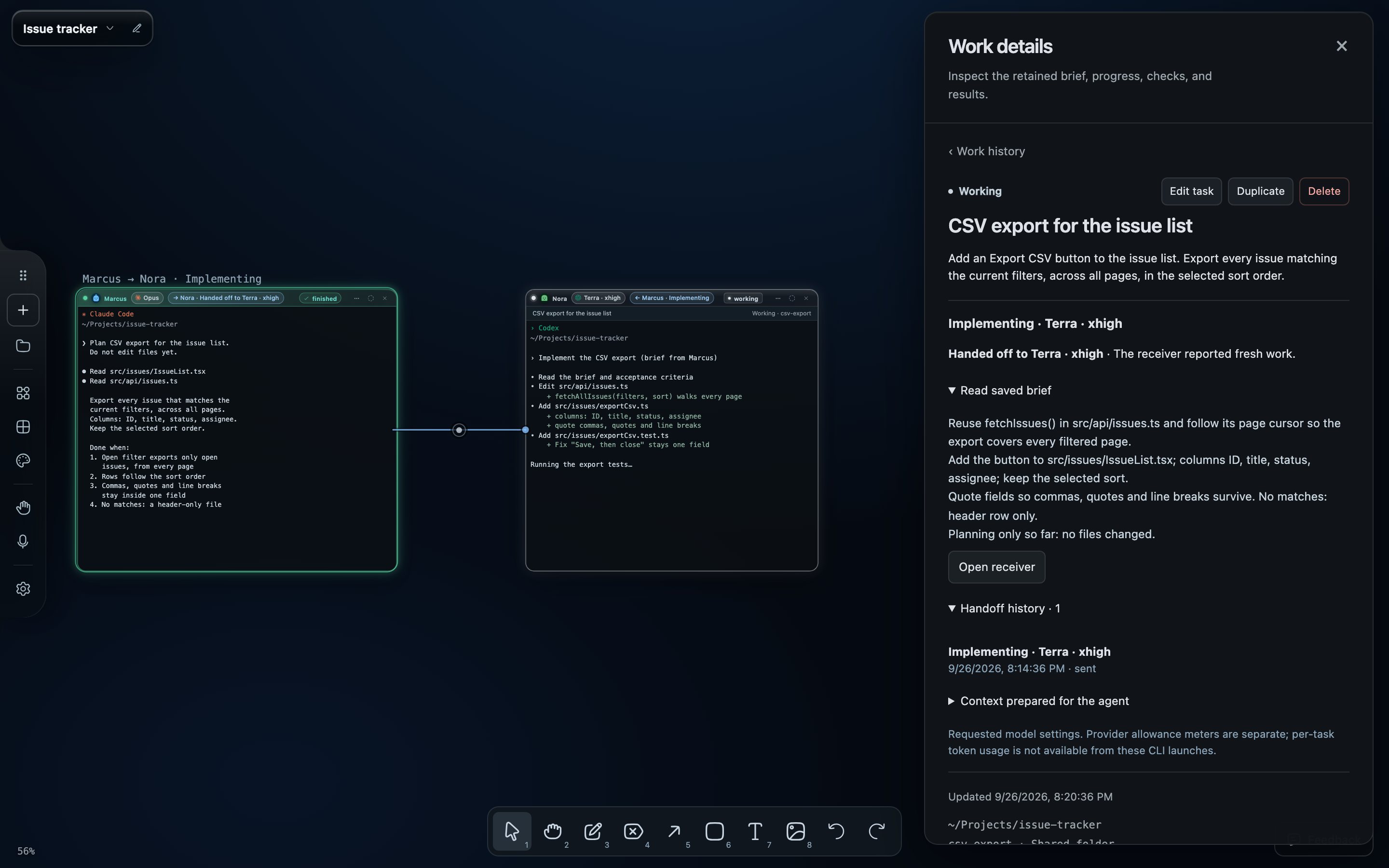
The Work details panel, captured from the app with a scripted handoff record. The issue tracker and its files are illustrative.
Settle what “export” means with Claude Code
Start Claude Code in the issue tracker's repository. Give it a planning request with a boundary:
Inspect the issue list and propose a plan for CSV export. Export every issue matching the current filters, across all pages. Use the columns ID, title, status and assignee. Preserve the current sort order. Identify the existing query and any export utilities we can reuse. Do not edit files yet. Flag decisions you need from me.
Read the plan before moving on. If the existing API returns one page at a time, decide now how the export will get the full filtered result.
For this example, agree on a few observable outcomes:
- Filtering to open issues exports only open issues, including matches beyond page one.
- Exported rows follow the selected sort order.
- Titles containing commas, quotes or line breaks round-trip as a single field.
- An empty result produces the agreed header-only file.
Good acceptance criteria for AI coding agents are outcomes you can check yourself. “Build the CSV feature we discussed” gives the receiving agent nothing to check against.
Hand the agreed work to Codex
In the Claude Code window's header, open ⋯ (Agent actions) and choose Hand off…. The card asks “What should the next agent do?” and lists the stages saved in Workflows. Choose Implement (“Builds it, runs checks, reports back.”), keep New agent, and set Receiving agent to Codex. Model and Effort apply to this transfer only (“Only this handoff uses these choices”); Change saved defaults opens Workflows. Existing agent hands the work to a Codex conversation already on the canvas instead.
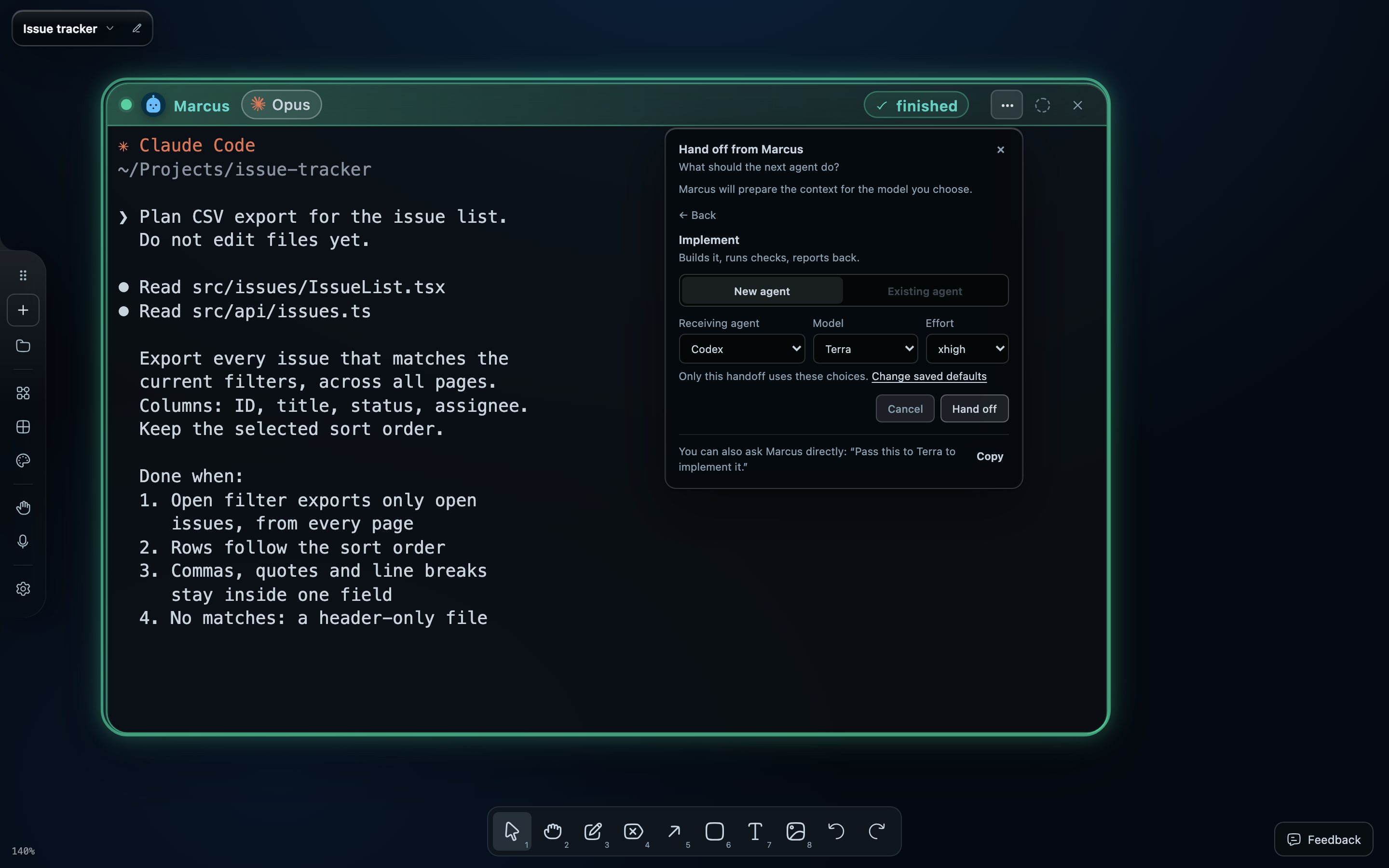
Captured from the app with scripted terminal output. The Model list comes from your Codex install; Terra is the app's default for the Implementation stage.
Press Hand off. Claude Code is asked to write the brief, since only it knows what the conversation settled, and to save the objective and acceptance criteria with it. When its turn finishes, the server starts the Codex window once, with no second confirmation.
You can also type the request. The card suggests “Pass this to Terra to implement it.”, and a fuller version works too:
Hand the agreed CSV export implementation to Codex. Include the chosen data-fetching approach, relevant file paths, filter and sort behavior, CSV edge cases, and acceptance criteria. Implementation is now authorized. Keep unrelated issue-list changes out of scope.
With voice on, you can hold Option and say it to the agent by name. Use one route, once.
See who has the work now
The Codex window arrives wired to the Claude Code window, so the Claude Code to Codex handoff stays visible. The wire's tag names the stage and its state, here Implementing · working, and each header says it from its own side: → Nora · Handed off to Terra · xhigh and ← Marcus · Implementing. Click the tag for a card with the first lines of the brief, the transfers so far and Open in Work, which leads to the full record.
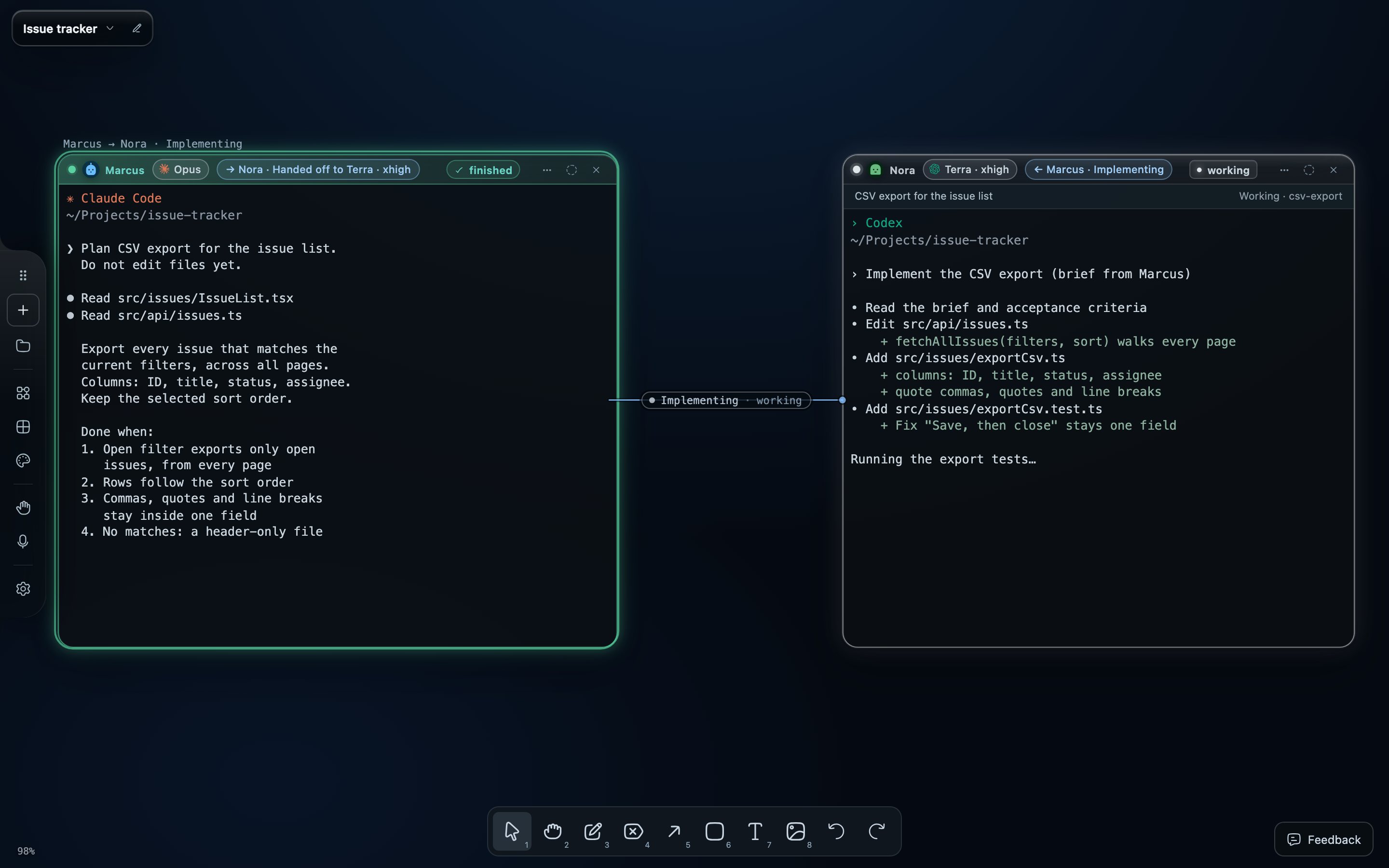
Captured from the app with a scripted handoff and terminal output; the CSV work shown is illustrative.
The Claude Code window stays open with its conversation, so I can still ask why it chose an approach, and Tidy seats the run together if the windows drift apart. When the change becomes a pull request, the Flight board widget, a GitHub panel on the canvas, lists it by what it needs: needs you, to review, approved, in review or drafts. It tracks pull requests; the wire tracks the handoff.
Check the file that actually comes back
When Codex reports completion, look at the result, not the report. Ask Codex to open the running app on the canvas: its open_browser tool puts a browser window beside the agent, and asking again after a fix reloads that window.
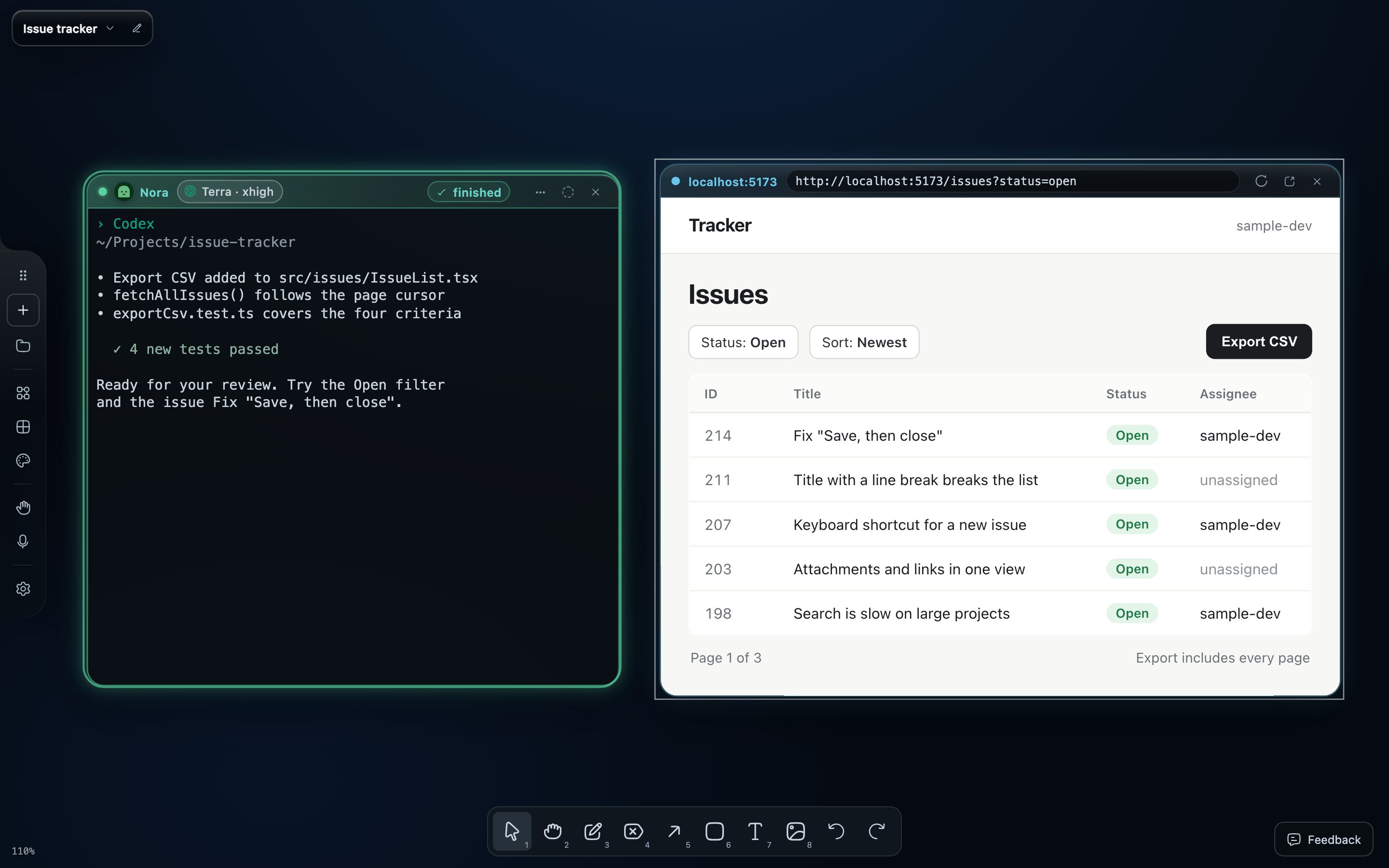
Captured from the app with scripted terminal output. The issue tracker page is a small sample served for the capture.
Export a filtered list longer than one page, including a title such as Fix "Save, then close" and one with a line break, and compare the file's rows with the intended result. Check the diff and the reported verification too. A finished turn is a cue to inspect the work; accepting it is your decision, made with Mark completed in Work details.
For a second opinion first, hand the work on again with Review (“Fresh perspective on the diff and goal. No edits.”). A single review stops at findings; Return fixes to the implementer runs a bounded review-and-fix loop instead. This walkthrough shows how to have a second AI agent review a fix with concrete questions.
The Starkomand features in this walkthrough
- Hand the work to another agent with a focused brief: Agent actions → Hand off…, a saved stage, and a model and effort for that transfer.
- Save the objective and acceptance criteria with the task: Work details keeps the brief and the handoff history.
- Handoff wires that show which agent works for which: the tag, the header chips and the transfer card.
- Claude Code, Codex and other CLI agents with your own sign-ins.
- A browser preview beside the agent that built it, plus the Flight board and review loops.
- Voice commands addressed to an agent by name.
More walkthroughs: coming back to two agent sessions without rereading their terminals, and why I put coding agents on an infinite canvas.
To try this on a small feature of your own, start the 3-day trial of Starkomand. It includes every feature, and your agents keep using the subscriptions you already have.