
Port 3000 already in use on Mac? How to find and kill the process
Kill port 3000 on a Mac: find what holds it with lsof, stop it safely, and free any other port. Plus how to stop dev servers your AI agents left running.
You run npm run dev and the terminal answers Error: listen EADDRINUSE: address already in use :::3000. Or nothing fails at all: Vite moves to 5174, and the browser tab on 5173 keeps showing an older build from a server you forgot about. Port 3000 already in use means another process is still listening on that port. On a Mac you can find it with one command and kill it with a second.
That is the first half of this post. The second half is why it happens much more often once coding agents start dev servers for you, and how I keep track of them in Starkomand, the Mac app I build for running agents on one canvas, with its Ports widget.
How to find what is running on port 3000 on a Mac
lsof -nP -iTCP:3000 -sTCP:LISTEN
-iTCP:3000 selects the port, -sTCP:LISTEN keeps only the process listening on it (without it you also get your browser's connections to it), and -nP skips name lookups so the answer comes back at once. The output looks like this:
COMMAND   PID USER   FD   TYPE  DEVICE  SIZE/OFF NODE NAME
node    41200 you    23u  IPv6  0x5f1d…      0t0  TCP *:3000 (LISTEN)
node on its own tells you little, since half the tools on a developer's Mac run on Node. Two more commands say what the process is and where it started:
ps -o pid,ppid,etime,command -p 41200
lsof -a -p 41200 -d cwd
The first prints the full command line and how long it has been running. The second prints its working directory, which is usually the project folder.
How to kill port 3000 on a Mac
kill 41200
kill sends SIGTERM, which lets the server close its sockets and exit. Run the first lsof again after a couple of seconds. If the port is still taken, kill -9 41200 ends the process without asking. The one-liner lsof -ti tcp:3000 | xargs kill does both steps in one go, but it stops whatever holds the port, so check what that is first. The same commands free any port: for 8080, put 8080 where these say 3000.
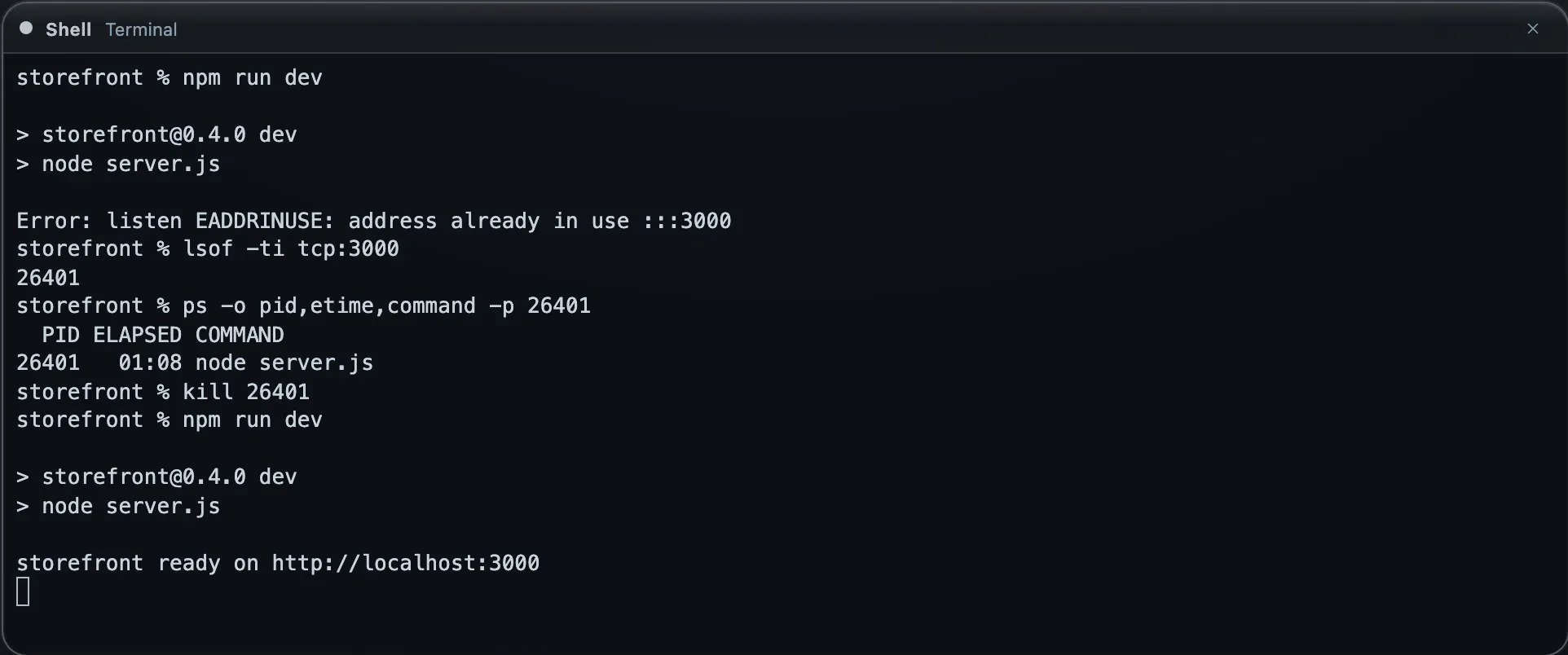
The whole loop in one real terminal, on a demo project. lsof -ti prints only the process ID, which is the form the one-liner above uses.
Avoid killall node. It ends every Node process on the Mac, including any agent CLI, language server or editor helper that runs on Node.
If you would rather move than stop, next dev -p 3001 or Vite's --port flag start the server elsewhere. Setting Vite's server.strictPort to true makes it fail on a busy port instead of moving to the next free one, so a stale server cannot hide behind 5174.
Why the port stays in use when AI agents run dev servers
An agent that changes a web app usually starts the dev server to check its work. That server can outlive the reason it was started:
- The agent ran it in the background, finished its turn and moved on.
- I closed the agent's window, but the server had been started with
&ornohup, so macOS handed it to launchd instead of ending it with the shell. - The agent worked in a git worktree that has since been deleted, and the server is still running from a folder that no longer exists.
With three or four agents that means three or four servers on ports that drifted to 5174 and 3001, and lsof cannot tell you which agent started which. Each one also holds memory. A server with a leaking file watcher can climb past a couple of gigabytes while nobody is looking at it.
I ran into a version of this while taking the screenshots for this post. I closed a window that still had npm run dev running and started another agent straight away. Starkomand keeps a closed window's processes for 60 seconds so you can undo the close, so the old server still held port 3000, and this is what the new agent reported:
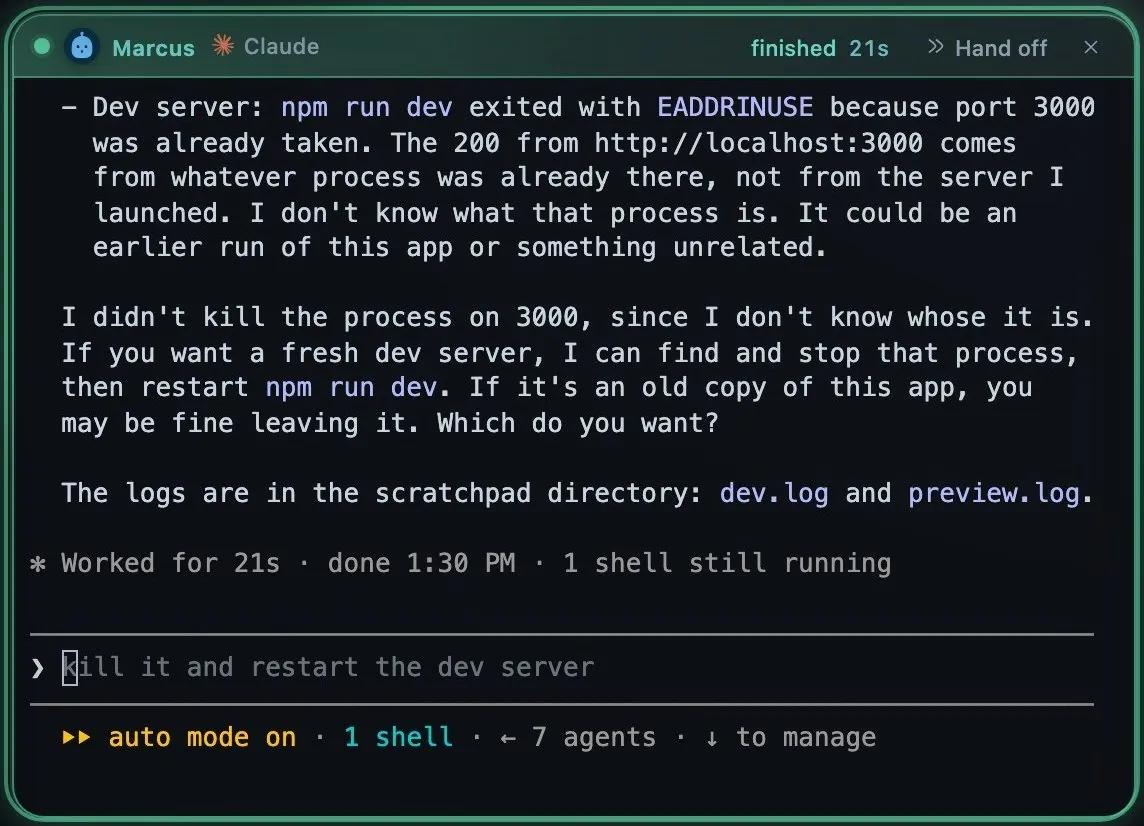
A real Claude Code session on a demo project. It stopped and asked, and did not kill a process it could not identify.
See every dev server on your Mac and the agent that started it
The Ports widget runs the same two commands for you, lsof for listening sockets and ps for the process table, every five seconds while the canvas is open and every thirty when it is hidden. It then attributes each listener to the agent window that started it by walking the process's parents up to that window's shell. When the chain is broken, as with a nohup server handed to launchd, it reads a tag that every process started in the window inherits.
To add it, ⌘-click (or right-click) an empty spot on the canvas and choose Ports under Widgets.
The top of the widget is a readout: what the dev servers hold in memory, their share of the Mac's RAM and CPU, and a bar that sets them beside other apps and free memory. Below it is one row per server, with the port, the project folder, the agent and git branch, a ten-minute memory sparkline and the current memory. Hovering a row lights up the border of the agent window that started it.
The agent windows show it as well. Turn a window over and its back lists the servers its agent started. Its header stays clean until one of them leaks, and then it shows a chip such as :6006. Clicking the chip opens that port in a browser window beside the agent, and clicking again reloads that window instead of opening another.
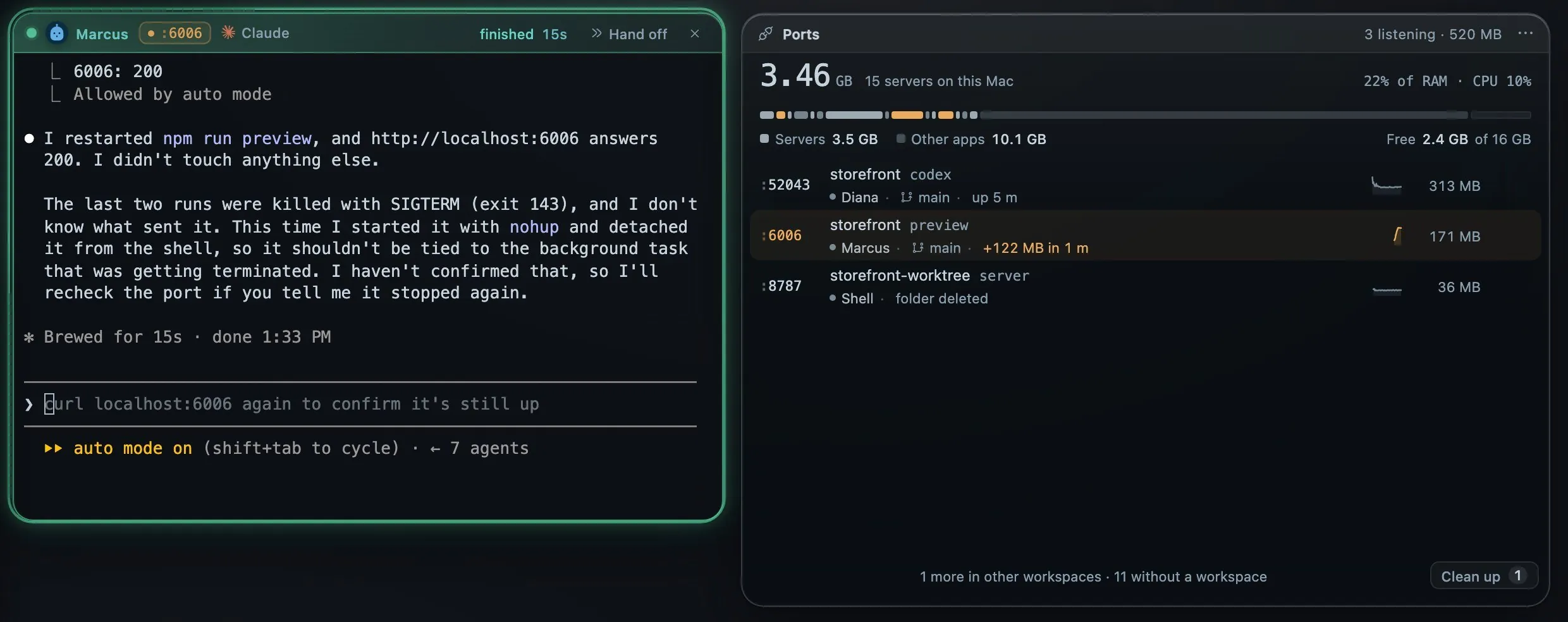
Real processes on a demo project. Marcus started the preview server, which has a small deliberate leak, and I lowered the growth rule to 50 MB so it would trip quickly. The default is 500 MB. I started the 8787 server in a shell window and then deleted its folder.
How to spot a dev server memory leak
By default a server counts as leaking above 2 GB, or when it grows by 500 MB within ten minutes. Its row turns amber and says how fast it grew, and the port chip on its agent's window turns amber too. Nothing is spoken and nothing pops up unless you turn on Notify when a server leaks, which sends a system notification when a server crosses the rule.
Click a row for its detail: the agent, branch, folder, framework, full command, start time, address and process count, with memory and CPU charts for the last ten minutes. Open preview and Stop sit at the top, and Stop asks before it acts.
How to stop dev servers nobody is using
Clean up in the widget's footer turns it to its cleanup side, with some servers already ticked:
- a server whose agent window was closed,
- a server whose folder was deleted, such as a removed worktree,
- a server with no agent that has been running for more than two hours.
Databases and other infrastructure are never ticked. Process names on the shielded list (postgres, redis, mysql, mongod, docker, orbstack and ssh by default) are left alone and ask before they stop, and Starkomand's own server is always shielded. You can add names of your own.
The button says what you get back, for example Stop 1 server · free 36 MB, and asks once more. Stop ends the server and its child processes, never the agent's shell, so the agent window keeps working.
The idle and leak thresholds are editable on the same side. Stop idle servers automatically is there too and is off by default. When on, it stops a dev server that has no agent, has been idle past your threshold and has nothing connected to it. It never touches shielded names, apps or agent CLIs.
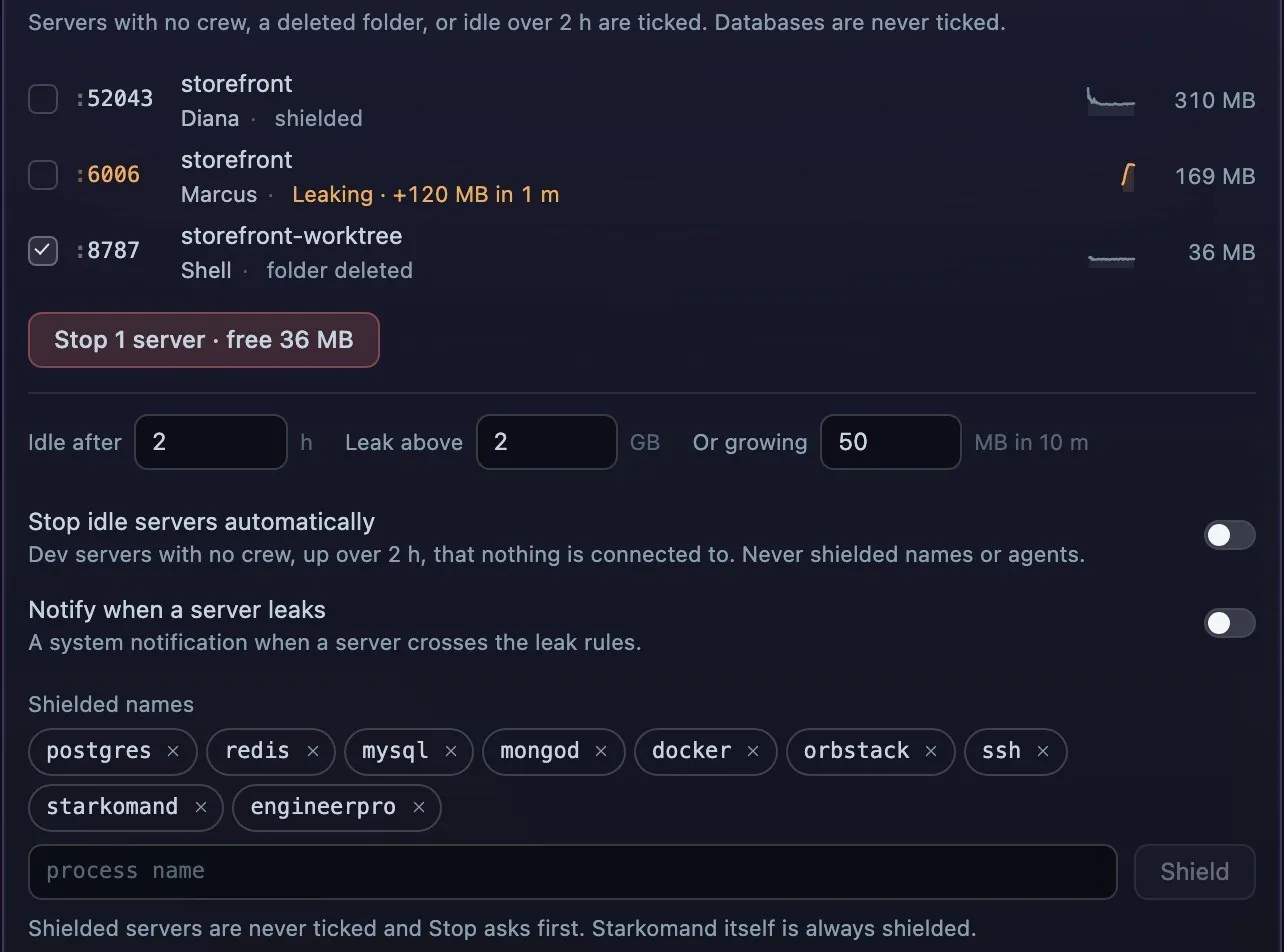
The same real processes. The 50 MB growth rule is my lowered setting from above. Nothing was stopped for this capture.
Ask what is running on a port by voice
If voice is set up, hold Option and say "what is on port 3000", and Starkomand reads the answer aloud, for example "Port 3000 is Felix's node in storefront, 612 MB, up 1 h 12 m." Saying "stop idle servers" stops what Clean up would tick, and "open Felix's preview" opens his server in a browser window beside him.
What the Ports widget does not do
- It runs on macOS and watches TCP listeners only.
- It does not change ports or edit configuration. It shows servers and stops the ones you choose.
- Servers started by persistent agents running in Herdr appear without an agent name, because those agents run outside the window's process tree.
- Nothing leaves the Mac.
lsofandpsrun locally, and the readings stay on the local server.
The Starkomand features in this walkthrough
- Ports widget: Widgets → Ports in the launch menu, the port chips on agent windows, the leak rules and Clean up.
- Open the preview beside the agent that built it.
- Talk to the canvas while you work: "what is on port 3000", "stop idle servers".
- One workspace per project, each with its own agents and widgets.
- Claude Code, Codex and the other CLI agents, with your own sign-ins.
More walkthroughs: run Claude Code and Codex side by side on one screen, and why I put coding agents on an infinite canvas.
To see every dev server your agents start, start the 3-day trial of Starkomand. It includes every feature, and it runs the agents you already have.